
Edited: 24 September 2026
Vinhomes Green Paradise master plan: choosing a district and unit
Read the plan in stages: the overall development, district, street and individual unit. Vinh Tien (The Haven Bay) and Vinh Ngoc (The Green Bay) include townhouses and villas. Actual availability needs a separate check when you enquire.
Discuss your requirements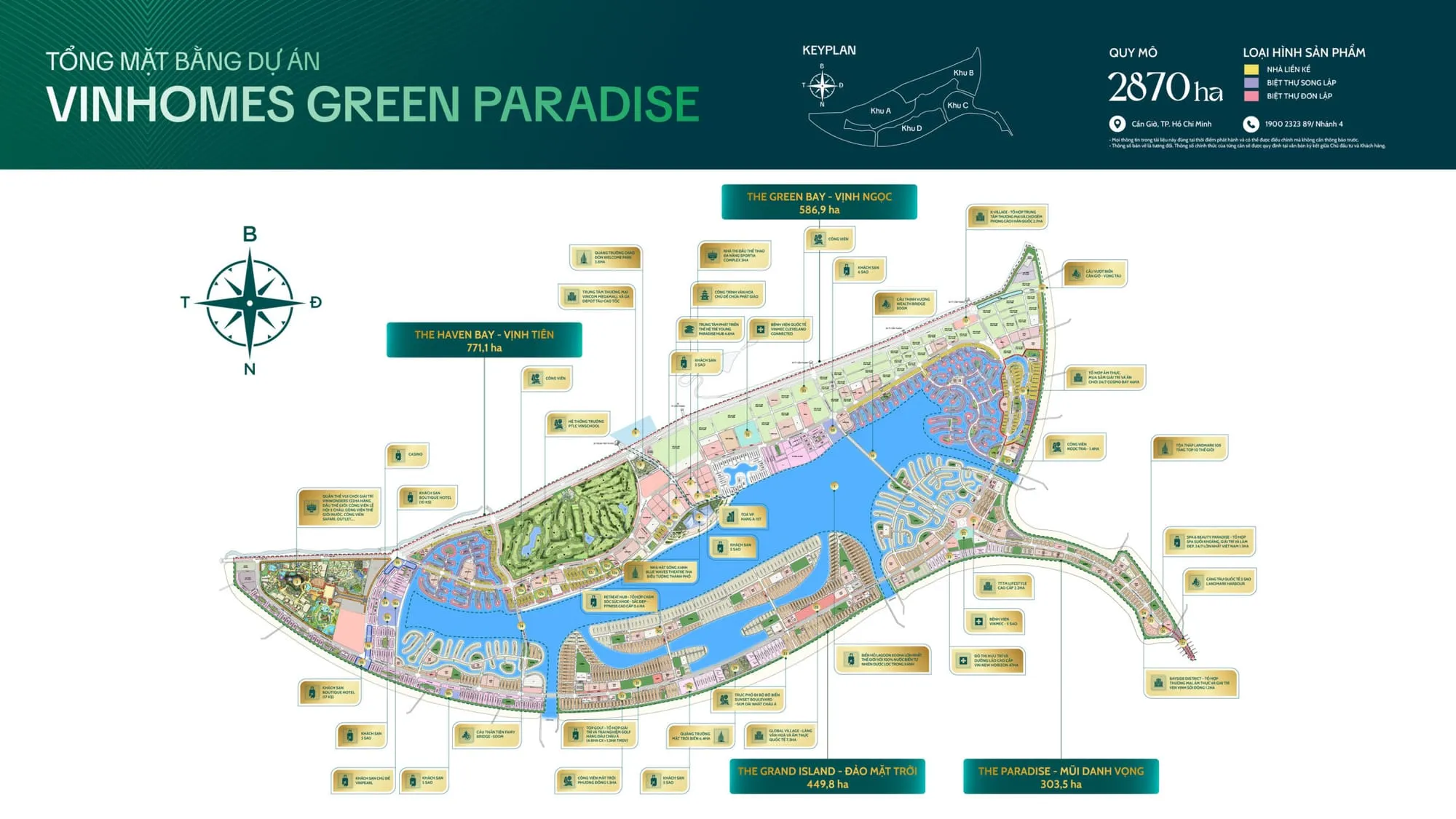
Start with how you will use the property
For a long-term home, compare daily journeys, usable local services and privacy. For a business, examine customer access, parking and the surrounding occupied catchment. A district name alone does not establish whether a particular unit suits your needs.
Read from the site plan to the floor plan
Locate the district and access points first. Then identify the unit code, orientation, frontage, rear access and adjoining plots. On the floor plan, separate land area from construction area and inspect stairs, lift provision, bedrooms and service spaces. A single area figure is insufficient to compare two units.
Request a consistent set of documents
Match the plot drawing, floor plan, handover specification and quotation to the same unit and revision. Check boundaries and rights over adjoining space for corner and waterside homes. The illustration below comes from the project material and does not replace contractual drawings. Share a unit code or your requirements for help comparing the documents.
Compare homes by how you plan to use them
Use the same criteria for two homes in Vinh Tien or Vinh Ngoc. Fill in the details from each unit’s documents; a district name alone does not establish a home’s characteristics.
| Criterion | Buying to live in | Buying for business use |
|---|---|---|
| Location & access | Daily journeys, noise and distance to services that are already operating. | Customer entrance, storefront visibility, parking and deliveries. |
| Area & layout | Separate land and floor area; check bedrooms, stairs and living space. | Measure space usable for the intended activity; check circulation and service areas. |
| Handover & fit-out | Compare the handover specification, furnishing costs and when you could move in. | Check permitted use, required fit-out and when operations could begin. |
| Total budget | Include the transaction price, applicable taxes/fees and fit-out; compare payment dates. | Separate acquisition from setup, operating costs and reserves; do not assume immediate revenue. |
| Documents to check | Seller entity, ownership and tenure, title certificate status, sale eligibility and the unit contract. | In addition to ownership documents, confirm permitted use and requirements for the intended business. |
To compare two homes, send their unit codes, districts, intended use and total budget. Prepare drawings, handover specifications and quotations dated the same day so the comparison uses a consistent basis.
Discuss the two homes you are consideringFrequently asked questions
Can a rendering establish what I am buying?
A rendering illustrates the design; it does not establish dimensions, plot boundaries or contractual handover scope. Check the unit drawing and contract annexes.
How do I request a unit-specific plan?
Send the unit code, property type or preferred district. If you have no code yet, start with intended use and total budget to narrow the selection.
Discuss master plan & unit selection
Choose what you need. Open WhatsApp directly without filling in a phone number.
Copy the prepared message, open WhatsApp or Zalo, then paste and send it.
The message is prepared on your device and has not been sent to an adviser. You send it in the chat app; this website does not store your entries.